Saturday, May 2, 2015

Quick answers to everything: Wolframalpha

Wolfram/Alpha - More than a Search Engine

You know that friend you have that seems to know everything, the guy that is like a human Encyclopedia?   This search engine is like having that friend on call all the time.   Unlike google that typically only gives you search results of websites that could answer your question, this search engine just gives you the answer.  So also unlike your friend, who will want to give you the twenty minute explanation and the full context of the answer, this will get straight to the point, more like the overworked and cranky teacher who knows the answer and just wants to move on.   Also like you friend and your cranky teacher you can ask for more in-depth answers, if you want it, just by scrolling down.
Try it out for yourself at http://www.wolframalpha.com/


Here are some examples of what Wolfram Alpha can do. http://www.wolframalpha.com/examples/
Try it out for yourself at http://www.wolframalpha.com/

Even MORE Google Search Tips and Trick


Here is a Slide Show of even MORE Google Search Tips and Trick from the students of Baker University.   Scroll through these interactive slides of just relax as it rolls through the great tips.  All of the links and videos are clickable.  When you see a slide you want explore more thoroughly, just click the pause button.  When you are ready to resume just click play again.  You can also navigate with the forwards and backwards buttons or with the Slide # drop down menu.


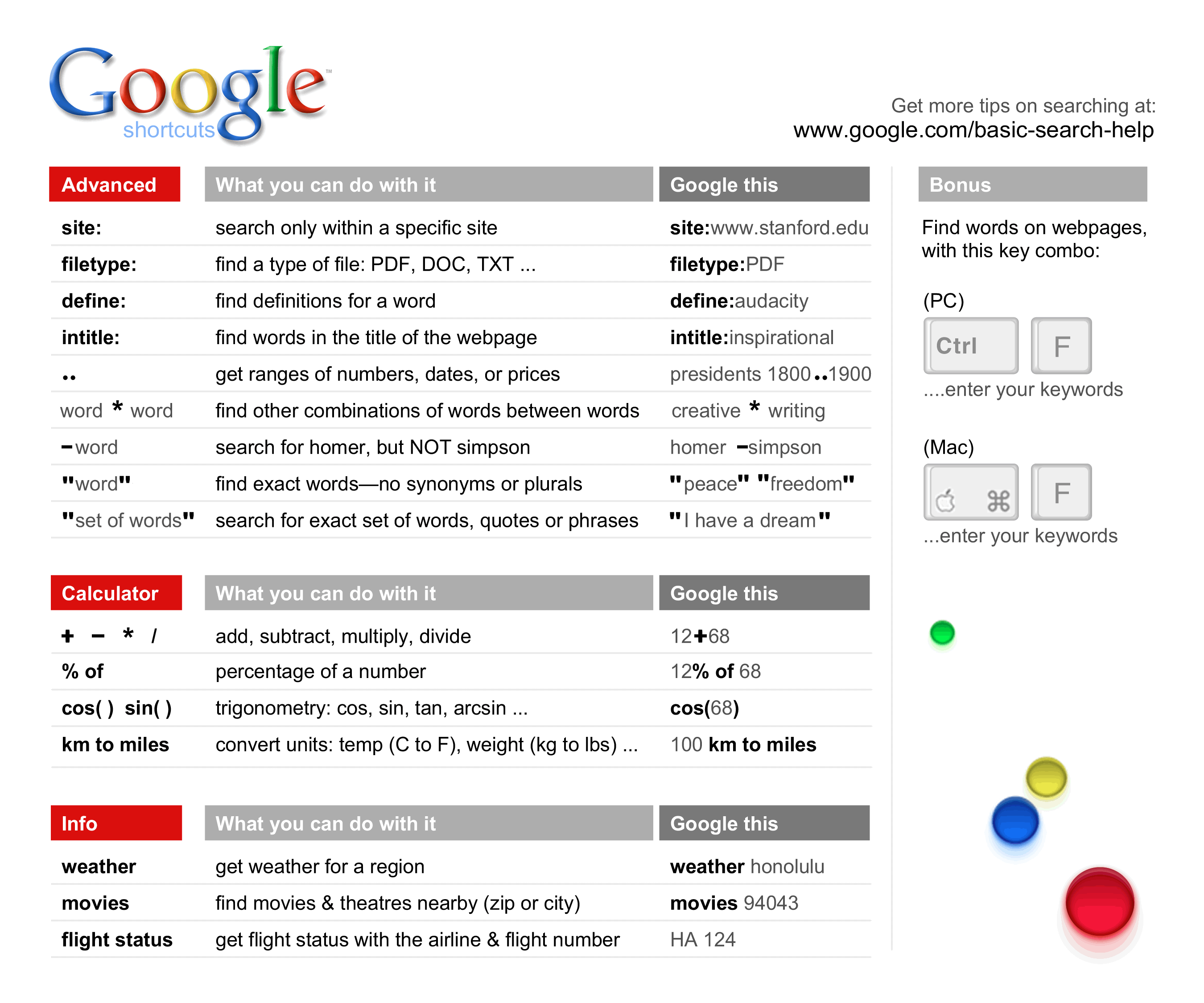
Also here is a Cheat Sheet.
Here is the original link for this image:
  http://dmrussell.net/search-education/Google-cheat-sheet-7.5X9-updated.png  

City Reports by Google

Complete City Report

Made easy with Google


Here is a fun quick project you can do with almost any grade. Have each student choose a city any city.  You could spin a globe to pick it out.  Then to find out lots of information about that city use these keywords in you Google search.


See Below for all the steps that were used to create the searches in the video.  

  • cityname Weather


  • cityname Time


  • cityname venue


  • currency converter


  • cityname map


  • flight times from cityname to cityname

OR….
Simply type in the name of the city and get all the information in one clear brief glance.

Sunday, April 26, 2015

Symbaloo is sooo cool

Symbaloo is a cool new way to collect and share websites for your students.  All the websites that you use on a regular basis that you want or you want your students to have easy access to all collected in one convent and graphically appealing place.  Below is a screen shot of what on of mine looks like.  It's not much yet but I plan on adding more of the uploading art links throughout the year.  Also as I find new cool resources for my students I can add it without them needing to update anything.  They stay up to date as I modify my Symbaloo.  Then all I is add the new site to my Symbaloo and the student then has access to it.  No more trying to type out tinyurls or scanning qr codes I can just tell them to go to my Symbaloo and click on the link we want to access.  Symbaloo also has an iPad app.  So for all the schools that are 1:1, your students can access it with the iPad too.


Here is a video that better explains what this is.  Making your own webmix is very easy and I am excited to use it with my students.  Now rather than having my students bookmark different sites for my class they can just bookmark this one site which I can update and change as needed.  You can also use this for yourself for all those sites that you go to often by setting this as your home page.


Social Media in Education

Think that Social Media is an unimportant frivolous activity that has no place in education.  Think again...


But if Social Media scares you check out this PowerPoint that will teach you how to safely use Social Media.  


Pinterest

Pinterest

What is it and why use it as a teacher?  
Imagine a giant cork-board. On that cork-board you have all those great tips tricks and hack, all those awesome lessons you want to try out someday, all the articles you want to read this summer when you have time.  This is another way to collect and share your internet finds.  I love how it is visual and easily organized.  Then when I want to go back and explore deeper I can find the board that I created, find the pin, click on it and it will link me to the site. Now imagine being able to see other teachers boards and taking the things they pinned on their boards. Using and exploring Pinterest is so much easier than I am making it sound.  This really, truly is one of my favorite tools that I use as a teacher and as an artist. Just watch the video below to see what I mean. 


Click here for a brief Tutorial.
Now sign up for a free account here.
4) If you want a place to start explore the resources below to find some inspiration on how to use Pinterest as an educator.
5) Below is a list put together by from Profession Marcia Jeans, of Baker University, of some great Pinboards from teachers/organizations. These are six pinners from the field of education and leadership . View some of their resources and add them to you own pinboards or follow them!
Vicki Davis (coolcatteacher)Vicki has created boards on: ”Being a Social Media Maven”, “Teaching Ideas and Apps” and “Collaborative Writing”, and my favorite “Global Collaboration in Education”.
One of the movers and shakers in the field of social media in education, Eric is using his boards to organize resources in the areas of educational videos, Google chromeextensions, Twitter apps and resources, Web 2.0 tools for educators and his personal learning network (PLN).
Karen is an educator with the Ontario Ministry of Education’s Literacy and Numeracy Secretariat. She has created boards on “Transforming Education”, “Great PD Links” and boards with resources in the areas of science, the arts, literacy and numeracy.
An ICT specialist in Missouri, Debbie has curated her resources on social media and web 2.0, ideas in education, infographics and her work as a PhD grad student.
Shannon’s boards run the gamut of teaching from kinder to language arts, and includes a great board on edtech essentials.
By far the busiest pinner of the list, Shelly has amassed an extensive set of resourcesin everything from digital storytelling and graphic organizers, to collaboration tools and word cloud tools.

Sunday, April 19, 2015

Lesson Plan databases

How to Write Find New Lessons

We all have our tried and true lessons.  The ones we love.  The ones we can teach in our sleep and that the kids look forward to every year.   We have tweaked and perfected these lessons over the years and they are the staples of our curriculum.  And then there are all the lessons in between these great loves.  These are the ones that aren't yet perfect or mandated from above or are just kind of boring.  These "in-betweeeners" are the replaceable.  However we often find our selves repeating these "in-betweeners" because we just don't have anything better and certainty don't have the time to develop something awesome.   This is when lesson plan databases are awesome!

All Teacher

Teachers Pay Teachers  - This is like an online lesson plan swap store, kinda like amazon for lesson plans.  I have found some real quality stuff and some fluff.  Most lesson seem to range between $0.00-10.00 and you can filter your searches with the the free option. You have to create a free account to download any materials. 
Share My Lesson Share My Lesson is a place where educators can come together to create and share their very best teaching resources. Developed by teachers for teachers, this FREE website gives access to high-quality teaching resources, including many lessons aligned to the common core.
ReadWorks This is not one that I have explored much because it doesn't have much for the arts.  However, I put it up here because it "provides research-based units, lessons, and authentic, leveled non-fiction and literary passages directly to educators online, for free, to be shared broadly. Best for grades K-6."*
SMART Board Files
SMART Exchange - "This is the big daddy of them all! This site has an amazing plethora of SMART Board files for your classroom. You must sign up for a free account. They are now starting to add some content that has to be purchased, but there are thousands of free Notebook files. Keep in mind you must have SMART Notebook software on your computer in order to open any of the files. It can be downloaded for free here. Choose version 11.4 for Windows or Mac if you want to be able to use it beyond 30 days."*
Harvey's Homepage -"Teach elementary or middle school math? Run on over to this website for some very high quality FREE Notebook lessons for math."* 

Art Teachers

Artsonia Lesson Plan Database

 For my fellow art teacher friends you might be frustrated by most of the data bases because the lessons offered are not the deeply rich Discipline Based Art Education (DBAE) lessons that you are looking for.   So again I direct you to Artsonia.com.  Honestly if you are an art teacher reading this blog you know my love affair with Artsonia and they are well deserving of my affection.  Their lesson plans are all written by real practicing art teachers.  Most of the lessons are  The consistent formate, the advanced search features, and the student example thumbnails are just some of the features that I love about this database.   You do need to be a teacher member of Artsonia to access this page, but if you are an art teacher you should be a member of this organization for so many other reasons anyway.  

The Incredible Art Department. 

This is the staple that has been around forever.  Since 1994 (which in technology years is forever) this site has been providing teachers with high quality DBAE lesson for art teachers.  These are useally very high end and involved lessons that need a lot of prep.  This is a great place to find some new favorites, but for better or worse these lesson tend to be a little "ivory tower."  This is good place to look for a new unit, but not for an inbetweener.


*Resource provided by Professor Marcia Jeans of Baker University